Now that NervaOne also works on Android, it made sense to rename the application and make some folder structure changes.
If you are running NervaOne v0.8.5.0 or any of the builds prior to v1.0.0, you might want to copy some files over to the new directory structure.
First, make sure you have seed phrases and private keys saved securely for all you wallets!
If you run NervaOne v1.0.0, it will create new application folder called NervaOne and put all files under that directory. If you didn’t have any wallet files, you can just go to Daemon Setup and set up Mining Address or any other settings manually.
Migrate Application Settings
If you want to migrate your setting, go to Settings > Open Logs Folder
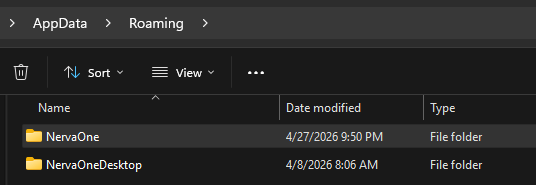
From there, go up 2 directories and you will see new NervaOne folder as well as old one called NervaOneDesktop. Go into NervaOneDesktop, copy app.config file and paste it into NervaOne directory.
Migrate Address Book
If you had address book, go to Wallet Setup > Open Wallets Folder
Find the same folder under NervaOneDesktop and you will find address.book file there. Under new NervaOne folder structure, this file has been moved and it needs to go under NervaOne > coins > xnv (or another coin such as xmr)
Migrate Wallets
If you want to move wallets, go to Wallet Setup > Open Wallets Folder
Find the same folder under NervaOneDesktop and copy all your wallet files to the new folder.
Migrate Client Tools
If you’re running custom build of CLI tools, go to Daemon Setup > Open Client Tools Folder
Find the same folder under NervaOneDesktop and copy the files from there to the new folder.
That’s it.