Hard fork 13 sync speed improvements

Hard Fork 13: A Fairer Algorithm, and Faster Sync

A while back we said sync speed was “only step 1” and that bigger improvements were coming. This is that step. Alongside Hard Fork 13, the upcoming release brings a sync experience that turns days into hours, plus the biggest change to Nerva’s mining algorithm in many years.

We heard you. Sync is now hours, not days

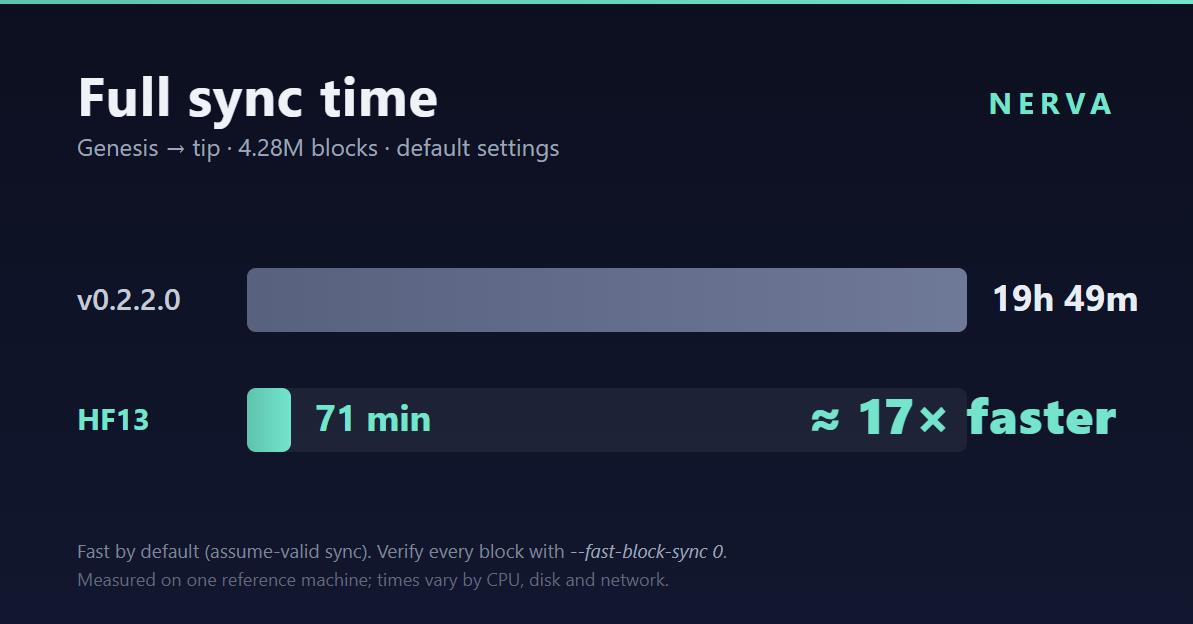
In v0.2.2.0, a full sync from scratch took around 20 hours. With the changes in this upcoming release, the same sync completes in about 71 minutes on our reference machine (a high-end AMD Ryzen 9 7950X).

That’s roughly a 17× improvement. Your exact time will depend on your CPU, disk, and network, but the shape of the improvement holds on any machine.

Where the time goes (and why this works)

The single biggest cost of syncing a Proof-of-Work chain isn’t downloading blocks but recomputing the Proof-of-Work hash for every block to re-verify it. On a chain of 4.28M blocks, almost all of that work re-verifies ancient, long-settled history. Nerva is heavier here than Monero by design: its algorithm derives each block’s hash partly from data scattered across the chain’s own history, so verifying a block means random lookups into many older blocks. That’s what makes Nerva pool-resistant but it also means the work grows as the chain does, since those reads spill out of fast CPU cache.

The last under 1% of the chain took nearly a third of the total time because those are the only blocks whose PoW was fully recomputed. Skip that redundant work on settled history and sync collapses from many hours to a fraction of the time.

That’s exactly what this release does. For blocks below a built-in, hardcoded checkpoint height, the daemon skips recomputing PoW and relies on the checkpoint instead. Everything else: difficulty, timestamps, transaction inputs and outputs, and the chain-linking between blocks is still fully validated for every single block.

“But I want to verify everything myself”

You can and it’s one flag.

The fast path is on by default because it gives the best experience for the vast majority of users. If you’d rather verify every block’s Proof-of-Work from genesis to tip, start the daemon with:

nervad --fast-block-sync 0

This re-runs PoW for the entire chain using the traditional, verify-everything sync. It takes considerably longer (the PoW work is the whole point), but the choice is yours. Fast by default, fully verifiable on demand.

Is the fast path safe?

Yes and the reason is the way a blockchain is built.

The release will ship with hardcoded checkpoints: known-good hashes of specific historical blocks. Because each block’s hash depends on its parent, which depends on its parent, all the way down, a checkpoint cryptographically pins the entire history beneath it.

If anyone tried to feed your node a doctored historical chain, altering even one old block would change every hash above it, and the chain would no longer match the checkpoint. Your node would reject it. The worst an attacker could do is make a not-yet-synced node stall, never accept a fake chain. The block hash is always computed independently by your own node; it’s never trusted from the network.

In short: the fast path trusts the software you’re running, not the peers you’re downloading from, the same trust you already place in the daemon binary.

Hard Fork 13: a fairer algorithm

Sync speed is half the story. HF13 also introduces CryptoNight-Adaptive v6, a reworked Proof-of-Work designed around a simple principle: 1 CPU = 1 Vote.

The new algorithm is memory-bound. Instead of rewarding raw core speed where high-end chips and specialized hardware pull far ahead, it gates each hash on memory latency, which is far more uniform across devices. The result is a per-core hash rate that drifts toward the same number whether you’re on a laptop or a large desktop, compressing the gap between small miners and big ones.

Three design choices make this work:

  • A random program every block. Each block runs a unique, unpredictable sequence of operations derived from the chain itself. This defeats fixed-function ASIC circuits. There’s no single pipeline to bake into silicon.
  • A large scratchpad. An 8 MB working area per hash starves GPUs of the occupancy they need to excel, while staying practical on ordinary CPUs.
  • A chain-rooted seed. The per-block program depends on real data from the blockchain itself, which makes centralized pool mining architecturally difficult, a core part of Nerva’s pool-resistant design.

Together they strengthen Nerva’s promise of CPU mining: open to anyone with an everyday computer, hostile to specialized and centralized hardware.

Keeping the new algorithm fast to sync

A memory-bound algorithm that reads from the blockchain could, in principle, make syncing slower as the chain grows. We designed around that with a sliding window.

When verifying the new algorithm, about 95% of the historical reads are drawn from the most recent ~100,000 blocks, roughly 5.6 MB of data that fits comfortably in a modern CPU’s L3 cache. The remaining ~5% reach into the full history to preserve pool resistance. The effect: verification stays cache-friendly and fast no matter how long the chain gets, so HF13’s stronger algorithm doesn’t come at the cost of sync time.

The bottom line

Hard Fork 13 will bring two things that matter to very different users:

  • New users get up and running in a few hours, not days.
  • Everyone gets a fairer, more decentralized algorithm, memory-bound, ASIC- and GPU-resistant, that keeps existing pool-resistance without giving up the option to fully validate every block.

Fast by default. Fully verifiable on demand. Fairer for everyone who mines.

That’s what’s coming in Hard Fork 13. Testnet soon.
Nerva CLI v0.2.3.0

Nerva v0.2.3.0: Legacy Reborn, Point Release 3

Overview

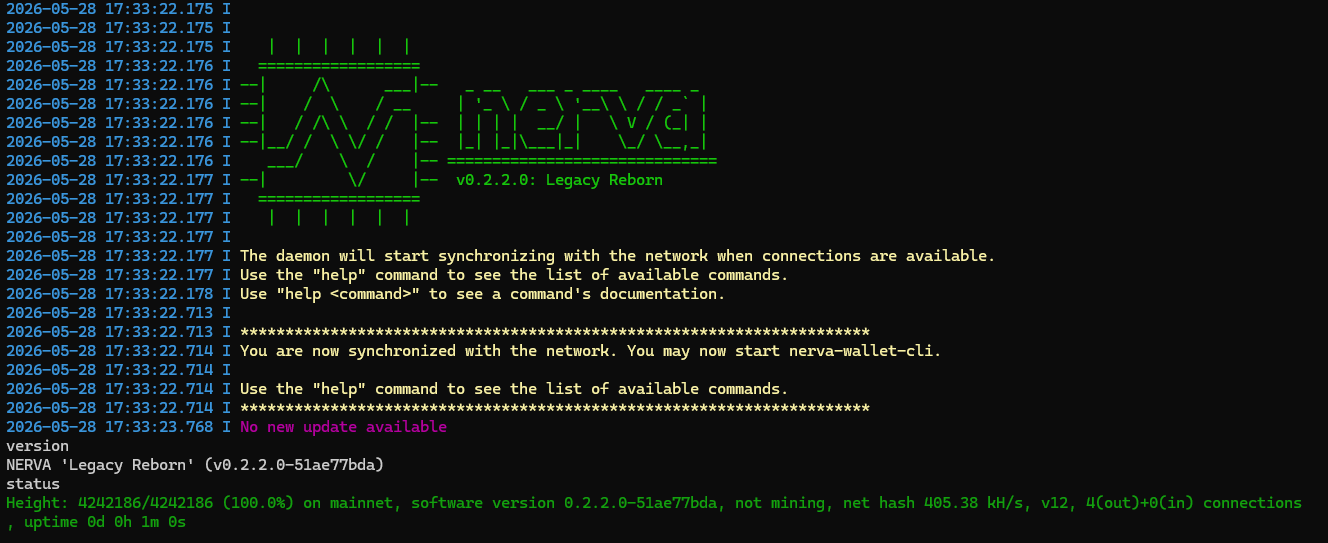
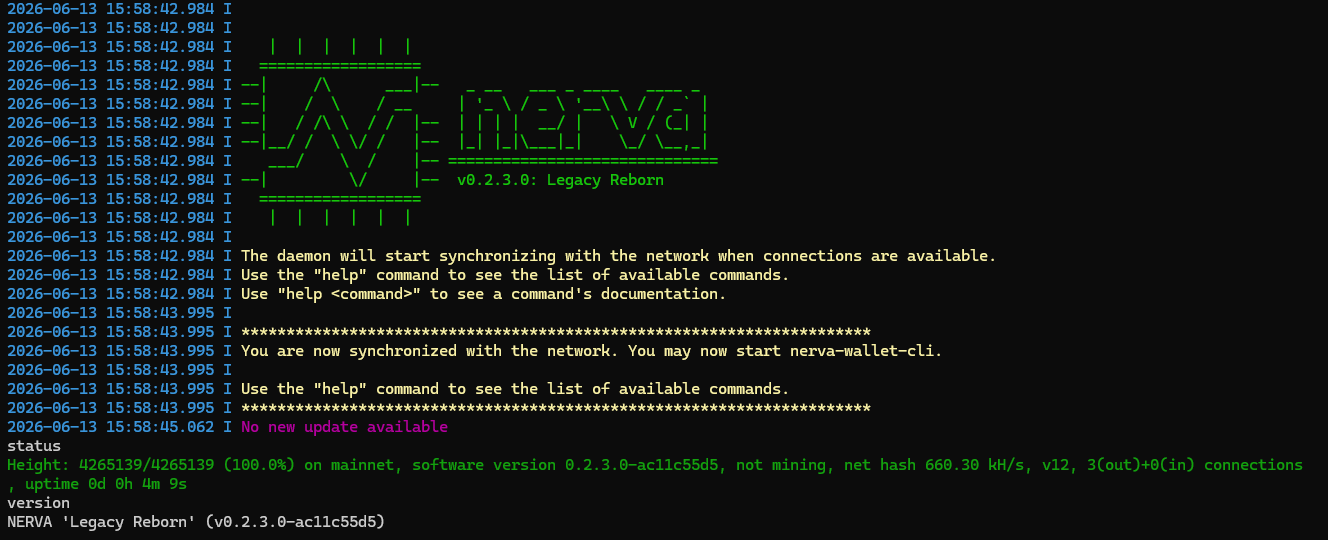
Nerva core v0.2.3.0 is a focused release that resolves a sync-halting crash affecting all users syncing from genesis, delivers measurable performance gains across both P2P and QuickSync, and extends hardware acceleration to ARM64 platforms. If you are syncing a fresh node without QuickSync, this upgrade is essential.

Sync Crash Fix (HF7 / CNA v2 Boundary)

Users syncing from block 0 encountered a fatal crash at block 173,500, the point where the CNA v2 proof-of-work algorithm activates at hard fork 7. The block cache was opening a read-only LMDB transaction that could not see blocks still pending in the current uncommitted write batch, resulting in an MDB_NOTFOUND error, peer disconnection, and a sync loop that could not progress past that boundary. The fix caps the adaptive sync batch size at 256 blocks, guaranteeing that all blocks needed for PoW lookups are committed and visible before the cache reads them.

Performance: Boost 1.89 Mutex Fix

A regression introduced with Boost 1.89 caused sleep_for(milliseconds(0), previously a no-op, to execute a real cond_timedwait costing approximately 1ms per call. Because CRITICAL_REGION_LOCAL invokes this on every mutex acquisition, the penalty accumulated across all lock-heavy code paths.

The fix removes the sleep from the hot path entirely, in line with upstream Monero. Measured impact on Windows:

  • QuickSync: ~10% faster
  • P2P sync: ~6% faster overall, with up to 16% improvement in the post-HF12 range (blocks 930k–1.2M) where lock contention is highest
  • Wallet generation: significantly faster (expanding the default subaddress lookahead previously triggered ~40,000 lock acquisitions, adding ~40 seconds of unnecessary sleeping)

ARM64 Hardware AES Acceleration

Hardware AES intrinsics are now enabled for 64-bit ARM targets, including Apple Silicon (M-series) and ARM64 Linux devices. This brings ARM performance in line with x86_64 for the cryptographic operations at the core of NERVA’s PoW.

Download & Upgrade

The sync crash fix makes this a required upgrade for anyone running a fresh node who wants to sync without QuickSync. All other users are encouraged to upgrade for the performance and wallet improvements.

🔗 https://nerva.one/#downloads

🔗 https://github.com/nerva-project/nerva/releases/tag/v0.2.3.0

Nerva v0.2.2.0: Legacy Reborn, Point Release 2

Nerva core v0.2.2.0 is out. This release delivers meaningful performance gains alongside targeted security and privacy hardening and marks real progress on the Nerva–Monero upstream gaps.

Performance

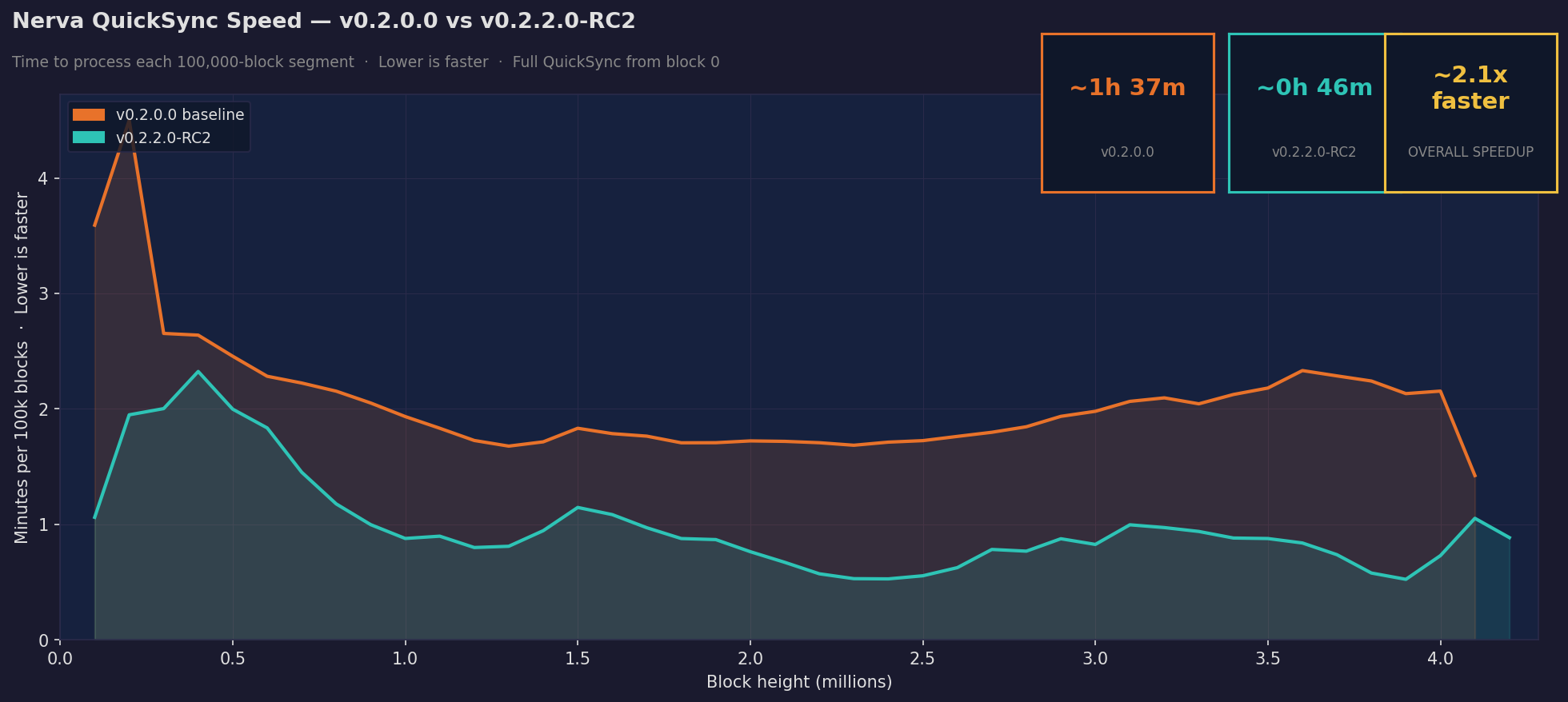
QuickSync is now 2x faster and full P2P sync is ~40% faster, both compared to v0.2.0.0. Getting a new node up and running has never been this quick.

Security & Privacy (Gap §2)

  • P2P message deserialization hardened, closing the critical crash exploitable via crafted P2P messages
  • Separate size limits for P2P vs RPC, addressing the memory exhaustion attack vector
  • RPC DoS mitigations against computationally expensive queries
  • LMDB deadlock fix under concurrent transaction access
  • Onion address exposure fixed. Peerlist responses no longer leak real timestamps or fixed positions
  • Peer subnet deduplication upgraded from /16 to /24 to reduce spy node effectiveness
  • Peer ID correlation on Tor/I2P disabled
  • Silent transaction drop on privacy networks fixed
  • Multiple decoy selection biases corrected including gamma distribution, integer truncation and sequential ring picking
  • Per-transaction DNS privacy leaks eliminated

Wallet & UX (Gap §5)

  • Pool spend detection fixed so balance updates correctly when a transaction is in the pool but not yet confirmed
  • Key image spent status corrected after confirmed spends, eliminating inflated balance display

We are closing the gaps

Download: nerva.one/#downloads or GitHub

Upgrade is not required but strongly recommended.

Next stop, hard fork 13.

Nerva v0.2.2.0-RC2 QuickSync: 2x Faster

We recently covered how v0.2.2.0 dramatically improves P2P sync speed. Those same optimizations carry over to QuickSync and the results are just as impressive.

QuickSync improvement by block range

Block rangeImprovement
0 – 500k~46% faster
500k – 1M~43% faster
1M – 2M~47% faster
2M – 2.5M~67% faster
2.5M – 4M~62% faster
Overall~52% faster (2.1x)

Testing was performed on an AMD Ryzen 9 7950X running Windows 11. Both versions were synced from block 0 using a fresh QuickSync file with no other load on the machine. v0.2.0.0 completed in 1h 37m, v0.2.2.0-RC2 in 46m.

The gains are consistent across the entire chain, with the biggest improvements in the second half where recent blocks are processed. Whether you’re syncing fresh via QuickSync or catching up over P2P, v0.2.2.0 is the fastest Nerva release yet.

Official v0.2.2.0 release coming out soon:

https://github.com/nerva-project/nerva/releases

How to Mine Nerva (XNV) on Android with NervaOne

Mine Nerva on Android with NervaOne

Most cryptocurrency mining requires expensive GPUs or dedicated ASIC hardware. Nerva is different. It’s designed specifically for CPU mining, which means any standard computer can participate. With the release of NervaOne v1.0.0, that now includes your Android phone.

This guide walks you through getting started.

What you need

An Android device (ARM64) and a bit of patience for the initial sync. No special hardware, no technical background required.

Step 1: Download NervaOne

Go to nerva.one/#downloads and download nervaone-v1.0.0-android-arm64.zip. Extract the ZIP to get the APK file.

Step 2: Install the app

Android will ask you to allow installation from unknown sources since NervaOne isn’t on the Play Store. Go to Settings > Security and enable “Install unknown apps” for your file manager, then open the APK to install.

Step 3: First launch

Open NervaOne and select Nerva (XNV) as your cryptocurrency. Then choose your operating mode:

  • Full Node – runs the blockchain locally and enables mining. Choose this.
  • Wallet Only – connects to a remote node, no mining. Good for checking balances on limited storage or mobile data.

Step 4: Synchronize the blockchain

Before you can create a wallet or mine, NervaOne needs to sync with the Nerva blockchain. If you’re below 90% synchronized, the app will offer to use a QuickSync file – accept this to significantly speed up the process. Wait until sync completes before continuing.

Step 5: Create your wallet

Once synced, go to Wallet Setup > Create New Wallet. You’ll receive a 25-word mnemonic seed and keys. Write this down and store it somewhere safe offline. This is the only way to recover your funds if you lose access to your device. Never share it with anyone.

Your XNV address will be visible in the Wallet section. Copy it, you’ll need it in the next step.

Already have a wallet?

If you’ve mined Nerva on desktop before, you can just use the same wallet to mine. No need to create or restore wallet on your Android device.

Step 6: Set your mining address

Go to Daemon Setup > Mining Address, paste your XNV wallet address, and tap Save Settings.

Step 7: Start mining

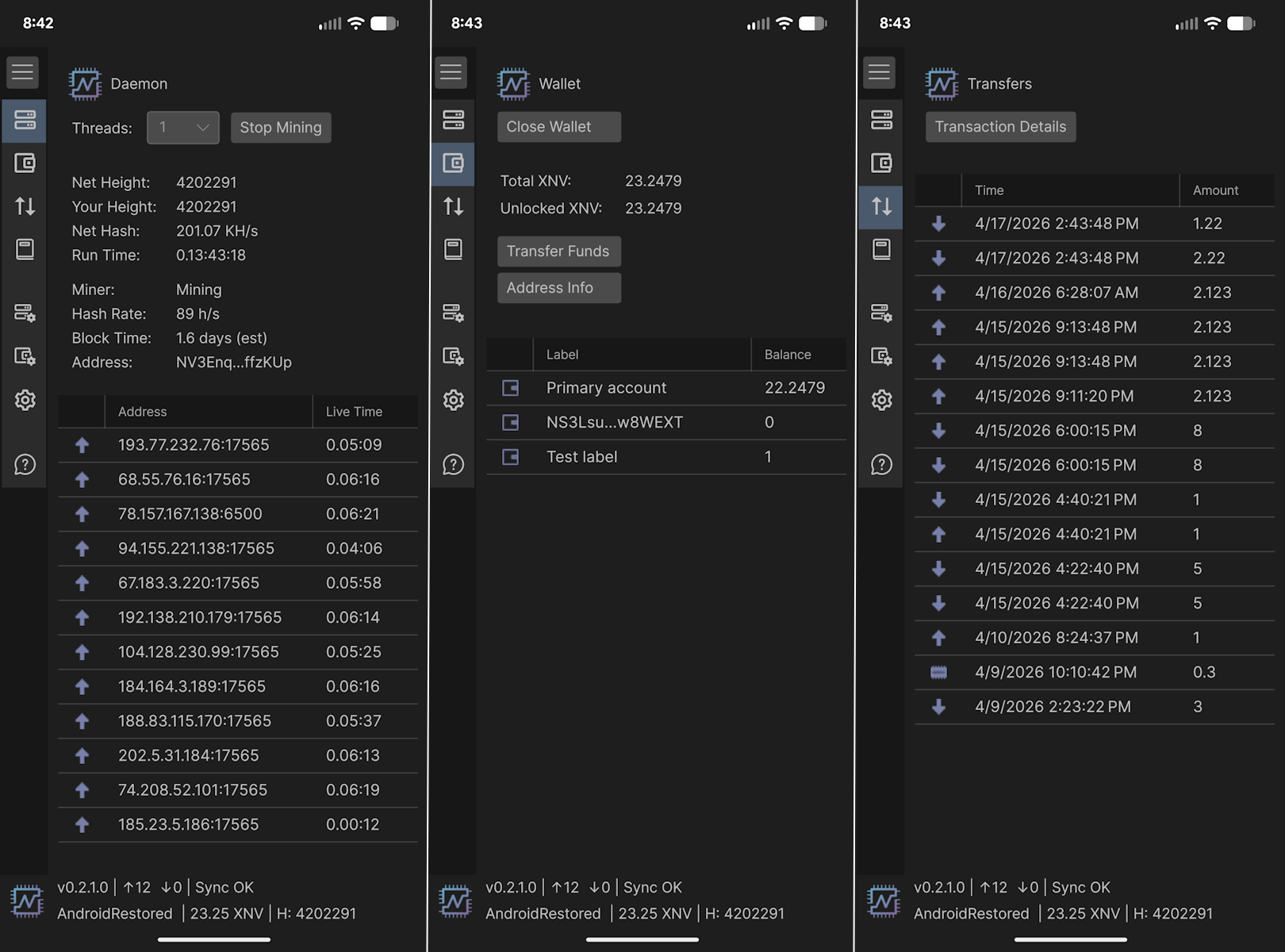
Navigate to the Daemon screen, pick number of threads you want to mine with and press Start Mining. Your phone is now contributing to the Nerva network.


A note on battery and heat

Mining uses your phone’s CPU continuously. If you run at high thread counts, expect your device to get warm and your battery to drain quickly. It’s best to mine while plugged in. You can reduce the number of mining threads in Daemon screen to find a balance between performance and heat that works for your device.

A note on mobile mining

Phone CPUs are less powerful than desktop processors, so your mining output will be modest. Think of it as contributing to the network’s decentralization rather than a primary income source – but it’s a legitimate, fully functional node running in your pocket.

Block rewards are currently 0.3 XNV with 60-second block times, shared across all active miners.


Join the community

Nerva has been running for eight years, fully community-driven since 2021. If you run into questions, the Discord and Telegram communities are active and helpful.


NervaOne Documentation: https://docs.nerva.one/guides/nervaone/

Nerva is now on KlingEx exchange

$XNV Now Listed on KlingEx

Nerva (XNV) is now available for trading on KlingEx, a small but up-and-coming exchange that just added $XNV to its lineup.

About KlingEx

KlingEx is an emerging exchange still establishing itself in the crypto space. It may not be a household name yet, but it adds another option for those looking to trade $XNV. More trading venues means more accessibility for the Nerva community.

Getting Started

Signup is straightforward: email, password, confirm, done. No lengthy verification process to get through the door.

KlingEx offers plenty of USDT deposit options, and depositing is as simple as generating a deposit address and sending funds. For $XNV specifically, expect 60 confirmations before your deposit clears.

Once funded, placing buy and sell orders is easy enough. Worth noting: KlingEx also offers liquidity pools, which is an interesting addition for a smaller exchange, something to keep an eye on if you’re interested in providing liquidity rather than just trading.

What is Nerva?

If you’re new to Nerva, here’s the short version.

Nerva is a privacy cryptocurrency built on CryptoNote technology, the same foundation as Monero. Every transaction is untraceable by design – sender, receiver, and amount are all hidden on-chain. There are no transparent transactions, no optional privacy. It’s private by default, for everyone.

Beyond privacy, Nerva is one of the few coins that remains genuinely decentralized at the mining level. It is CPU-mineable only, with no ASIC support and no mining pools, keeping the network in the hands of individual participants rather than industrial operations.

No company. No venture capital. No developer tax. Just a community that believes in what it’s building.

Start Trading $XNV

The XNV/USDT trading pair is now live on KlingEx:

https://klingex.io/trade/XNV-USDT

A Reminder on Exchange Safety

As always – never keep more funds on any exchange than you are prepared to lose. Withdraw to your own wallet when you’re done trading.

Not your keys, not your coins.